Skills like communication, creative problem-solving, and cooperation are no longer optional “soft skills”—they are the essential currency of the future.
The challenge and opportunity lie in the tools already at our fingertips. How can we leverage technology, not as a digital worksheet, but as a powerful catalyst for building a collaborative classroom culture? How do you transform your students from isolated learners into collaborative creators? Try these three strategies to enhance your curriculum with creative and collaborative inquisition:
Unlock every voice
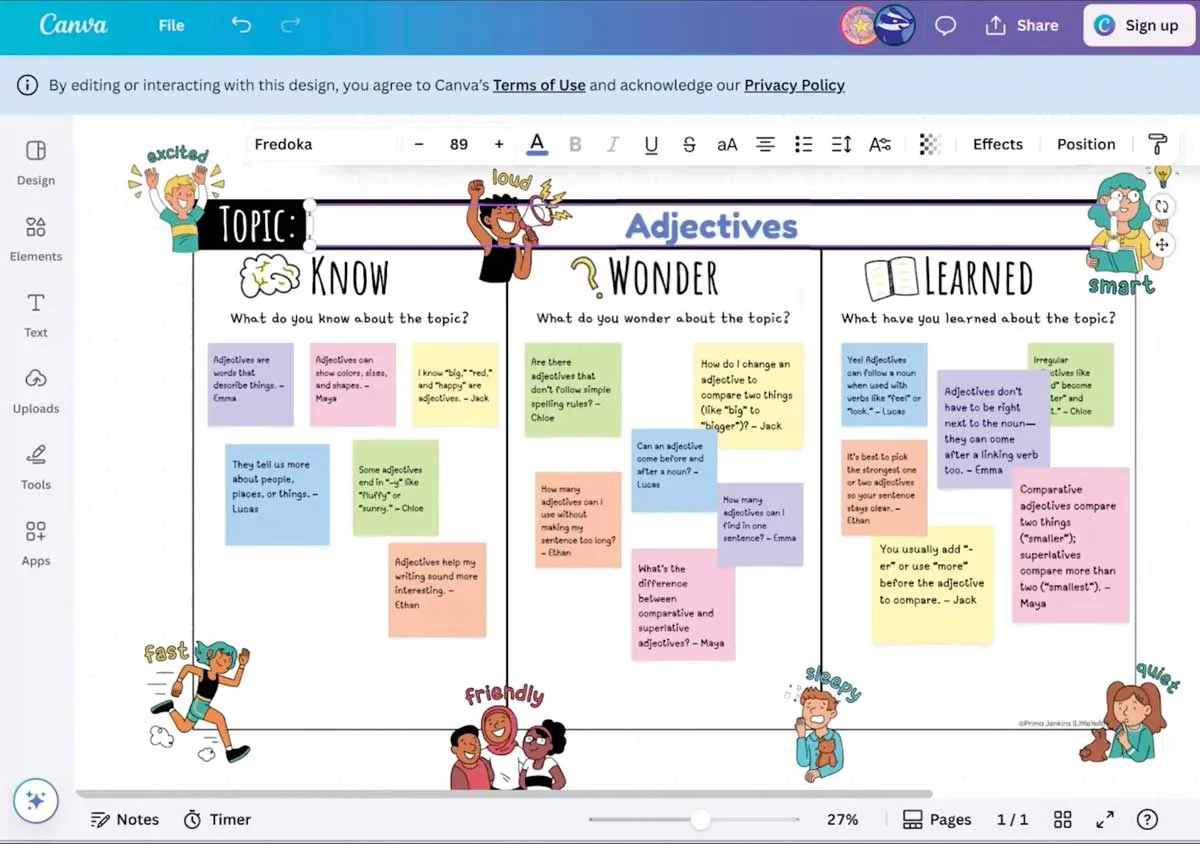
The classic brainstorming session is often dominated by a few outspoken students. Digital canvases, such as Microsoft Whiteboard or Canva Whiteboard, can completely change this dynamic. Digital devices democratize the ideation process through shared virtual spaces.
Every student—from the bold leader to the quiet reflector—can simultaneously contribute their thoughts with digital sticky notes, images, or drawings. What begins as a blank slate quickly becomes a vibrant mosaic of collective ideas, ensuring every voice is heard and seen.
Build a living document
Group projects often mean that one student does the work while others add their names. Collaborative platforms, such as Google Docs, Google Slides, or Microsoft 365, change the game by fostering true co-creation and shared ownership.
Instead of dividing and conquering, students can work within the same document in real time. The magic lies in features that promote teamwork. For example, you can use the comment function for constructive peer feedback; use track changes to see the group’s thought process evolve; and assign specific sections to ensure equitable contribution. The final product isn’t just a patchwork of individual efforts, but a cohesive piece crafted by a team.
One project that I share with my students each year invites students to create flip-book-style animations using Google Slides or Microsoft 365. Once the students have chosen characters and themes for their stories, it’s off to the races. Together, they are able to create a pretty impressive animated short story.
Create cohesion with a project hub
“Who was supposed to do that?” is the all-too-common refrain of group work. Technology can bring clarity and real-world project management skills to your classroom. Simple tools like Google Sites and Canva websites, or even a well-structured Google Sheets or Notion dashboard, can serve as a central project hub. Here, students can break down large assignments into smaller tasks, assign roles and deadlines, and visually track their progress from “to do” to “in progress” to “complete.”
This transparency demystifies the workflow, minimizes confusion, and empowers students to hold themselves and their peers accountable—just as they will in their future careers.
Foster innovation
Ultimately, these tools are simply a means to an end. The goal is to design learning experiences where collaboration is not just an option, but an authentic and essential part of the process. By thoughtfully integrating technology, we can build classrooms that are more than just places of instruction—they become incubators for the next generation of innovators, thinkers, and team players.
Building these skills is a journey, and you don’t have to do it alone. The conversation continues with educators who are putting these ideas into practice every day. To hear more in-depth strategies, discover new tools, and learn from fellow educators, I invite you to visit TeacherCast.net for educational podcasts, resources, and a community dedicated to instructional